Common Sustain Pedal Problems and Easy Fixes

Common sustain pedal problems often come from simple issues. The pedal may set the wrong polarity, the cable may be loose, or dirt may be blocking it. These problems sound scary, but they are easy to fix at home without any special tools.
In this guide, you will learn how to find the real cause fast. You will also learn simple steps to fix sustain pedal issues on digital pianos, MIDI keyboards, and stage pianos without special tools.
Quick Summary of Common Sustain Pedal Problems
Here’s a clear summary table of common sustain pedal problems.
| Problem | Likely Cause | Quick Fix |
|---|---|---|
| Pedal not working | Wrong polarity, loose cable, or faulty switch | Push plug fully in, flip polarity switch, restart keyboard |
| Pedal works in reverse | Polarity mismatch with keyboard | Flip polarity switch or power on keyboard while holding pedal down |
| Pedal stuck on (notes sustain constantly) | Wrong polarity, dust inside pedal, damaged cable, stuck software setting | Restart keyboard, flip polarity switch, unplug/replug pedal, test another pedal |
| Pedal not sustaining notes | Using wrong jack, sustain off in settings, or sound doesn’t support sustain | Plug into correct jack, enable sustain in settings, use a piano sound |
| Loose or intermittent connection | Loose plug or dirt in jack | Firmly push plug, clean jack with air or rubbing alcohol |
| Pedal not working on digital piano | Pedal type mismatch (on/off vs continuous) | Use brand-recommended pedal, check manual, update firmware |
| Squeaky pedal | Dry metal/plastic parts inside | Apply white lithium grease to contact points |
| Cable broken inside | Frequent stepping on or bending cable | Replace cable or pedal |
| Over-pedaling for wrong style | Not adjusting pedal to music genre | Use less pedal for jazz/rock, more for pop/romantic classical |
Why Do Common Sustain Pedal Problems Happen So Often?
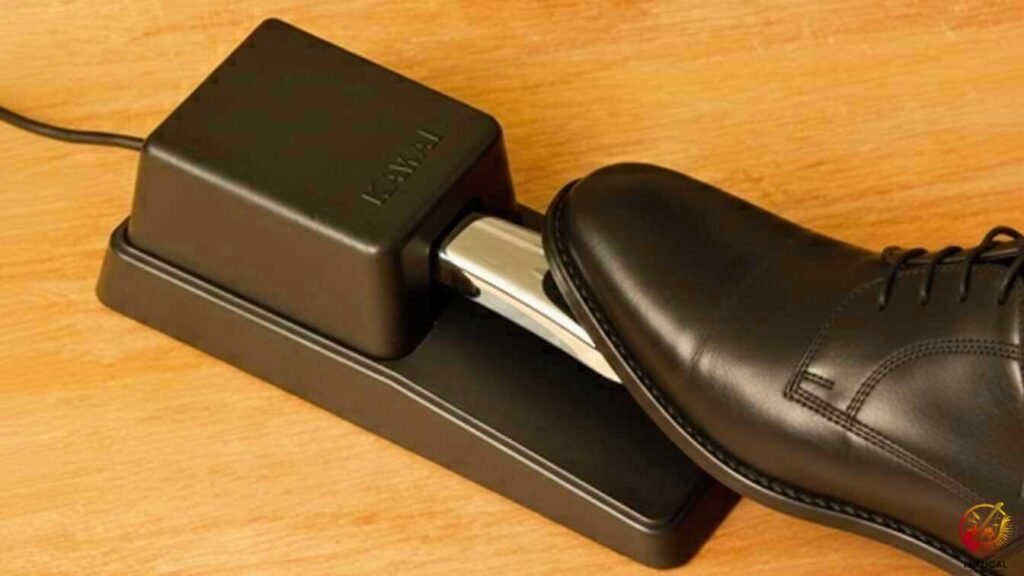
Common sustain pedal problems happen because the pedal setup is easy to get wrong. The pedal itself is simple, so one small mistake can stop it from working right.
A sustain pedal uses one switch, one cable, and one setting. If any part is off, the pedal will not work right. Most problems are not real damage. They are user errors.
After setting up many keyboards, one thing is clear. Most pedal issues come from setup mistakes, not bad pedals. Very few pedals are truly dead.
Common causes include:
- Plugging the pedal in after turning the keyboard on
- Using the wrong pedal polarity setting
- Loose or dirty cable connections
- Pedal settings inside the keyboard menu
- Worn cables from foot movement
Most sustain pedal issues are easy to fix at home. You usually do not need new gear or tools. A quick check and small adjustment often solves the problem.
Why Is My Sustain Pedal Not Working?
Your sustain pedal is not working because of the wrong polarity, a loose cable, or a bad switch. Most of these problems are easy to test and fix at home.
A sustain pedal is a simple tool. When one small thing goes wrong, it feels broken. In most cases, the pedal still works. It just needs the right setup.
Before thinking it is dead, try a few quick checks. Many pedals start working again after simple steps.
Easy Fix
- Push the pedal plug in all the way
- Turn off the keyboard
- Unplug the pedal and wait 10 seconds
- Plug the pedal back in
- Turn the keyboard on again
Many keyboards reset the pedal when they restart. If this does not help, the issue needs closer checking.
If it still fails, check polarity.
Some pedals have a polarity switch on the side or bottom. Flip it and test again.
What Is A Sustain Pedal Polarity Issue?
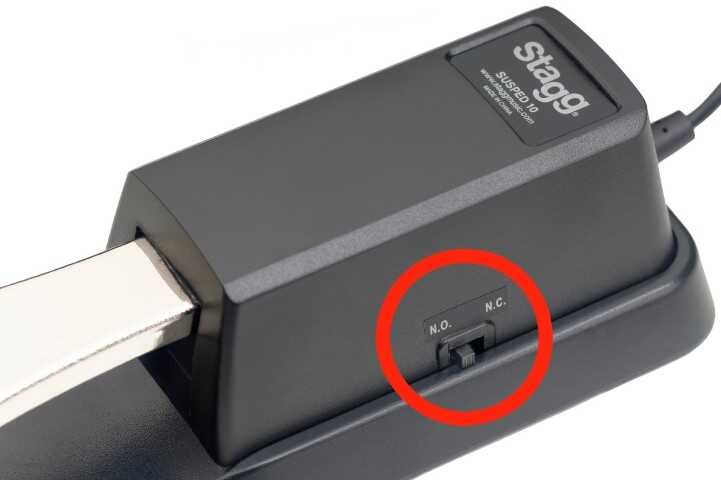
A sustain pedal polarity issue means the pedal works in reverse. You press the pedal, and the sound stops. You lift your foot, and the sound sustains.
This feels confusing but is very common.
Keyboards from Yamaha, Roland, Casio, and Korg may use different polarity logic. One pedal does not match all keyboards by default.
Signs of polarity problems
- Notes sustain without pressing the pedal
- Pedal only works when your foot is off
- Sustain pedal stuck on all the time
Sustain pedal fix
- Look for a polarity switch on the pedal
- Flip the switch
- Restart the keyboard
If your pedal has no switch, unplug it. Hold the pedal down. Then turn on the keyboard while holding it. This forces the keyboard to learn the pedal state.
Why Is My Sustain Pedal Stuck On?
A sustain pedal stuck on means notes never stop ringing. This can ruin practice and recordings.
In real pianos, this would mean a jammed damper. On digital gear, it is usually a signal issue.
Common reasons
- Polarity set wrong
- Dust or dirt inside the pedal
- Damaged cable near the plug
- Software sustain setting stuck
Quick troubleshooting steps
- Restart the keyboard
- Flip the polarity switch
- Unplug and replug the pedal firmly
- Try another pedal if possible
If the problem only happens sometimes, the cable may be failing. Foot movement slowly breaks wires inside.
Why Is The Sustain Pedal Not Sustaining Notes?
If your sustain pedal is not sustaining, it may still send a signal. The keyboard just does not respond to it. This is different from a pedal that does not work at all. This often happens on digital pianos and MIDI keyboards.
Check these first
- Are you plugged into the correct jack?
Some keyboards have expression pedal and sustain pedal ports. - Is sustain turned off in the settings menu?
- Are you using a sound that supports sustain?
Some synth pads and organ sounds ignore sustain by design. Test with a piano sound first.
How Do Sustain Pedal Connection Problems Happen?
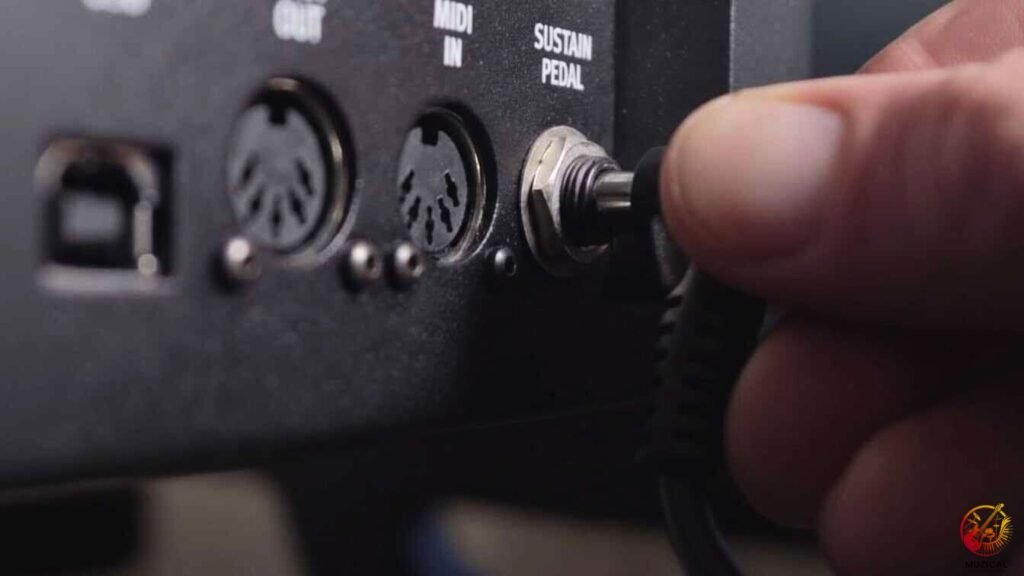
Sustain pedal connection problems usually come from loose plugs. The pedal jack sits on the back or underside of the keyboard. It gets bumped often. Even a small gap can stop the signal.
What to do
- Push the plug in firmly until it clicks
- Avoid angled plugs if space is tight
- Do not use headphone extension cables
Also check for dirt. Dust can block contact inside the jack.
A quick blast of air can help. Never pour liquid inside the jack.
Why Does My Sustain Pedal Not Work On A Digital Piano?
Your sustain pedal does not work on a digital piano because the pedal type does not match the piano. Many digital pianos only respond to specific pedals.
Digital pianos are picky about pedals. Beginner models often expect a certain switch or signal. If the pedal is wrong, it may fail or act strange.
Some pianos use a simple on-off pedal. Others need a continuous pedal for smooth control.
Common digital piano sustain pedal issues
- Pedal not detected at all
- Half-pedaling does not work
- Pedal works sometimes, then stops
Fix steps
- Check the piano manual for pedal type
- Use the brand-recommended pedal
- Update firmware if available
Brands like Yamaha and Roland follow strict pedal rules.
Why Does My Pedal Squeak When I Press It?
Your pedal squeaks because dry parts rub inside the case. This is a mechanical issue, not an electronic problem.
A squeaky pedal can distract you, especially during soft music. Over time, the grease inside dries out. When metal and plastic parts rub together, they make noise. This is normal with older pedals and easy to fix.
How to stop the squeak
- Do not use WD-40. It is too thin and can harm plastic.
- Use white lithium grease from a hardware store.
- Open the pedal. Most pedals have screws on the bottom.
- Be careful. The spring inside may pop out.
- Apply a tiny amount of grease where plastic touches metal or the spring.
- Close the pedal and tighten the screws.
- Press the pedal a few times to test.
The squeak should be gone, and your pedal will feel smoother.
How to Fix Sustain Pedal Problems: Step-by-Step Solutions
You can fix most sustain pedal problems by checking simple things first.
Follow these steps in order to find the real cause fast.
Step 1: Check the cable Unplug the pedal. Plug it back in firmly. Make sure it is pushed in all the way.
Step 2: Check pedal direction Turn the keyboard off. Plug in the pedal. Turn the keyboard on again. If your pedal has a switch, try the other setting.
Step 3: Clean the pedal Open the pedal bottom. Wipe dust from the switch. Clean the plug with alcohol.
Step 4: Test the cable Gently bend the cable while pressing the pedal.
If the sound cuts in and out, the cable is damaged.
Step 5: Try another pedal Use a different pedal to see where the problem is.
Step 6: Check keyboard settings Reset pedal or sustain settings to default.
What Should I Do To Prevent Future Sustain Pedal Problems
You can prevent sustain pedal problems by caring for the cable, pedal, and storage. Small habits protect the pedal and help it last for years.
- Place the pedal so the cable runs away from your feet. Do not let your feet rest on the wire. Stepping on it breaks wires inside.
- Coil extra cable loosely. Use a soft strap. Do not wrap it tight around the pedal.
- Unplug the pedal when moving your keyboard. This stops the jack from bending or breaking.
- Wipe the bottom of the pedal every few months. Dirt can slowly move inside and cause issues.
- Store the pedal in a dry place. Moist air can damage metal parts. In humid areas, keep it in a sealed bag with a drying packet.
Common Sustain Pedal Problems: Final Thoughts
Common sustain pedal problems are simple and easy to fix. They usually come from wrong settings, loose plugs, or dirt inside the pedal. You can solve these issues in just a few minutes at home.
Keep a few basic items near your keyboard. A small screwdriver, contact cleaner, and rubbing alcohol fix most problems. You do not need special tools to get started.
Remember, sustain pedals wear out over time. They get pressed thousands of times. When one finally fails, it is normal. Replace it and move on.
A working sustain pedal makes your music sound better right away.
Now you know how to spot problems and fix them fast. That means more time playing and less time worrying.
FAQ: Common Sustain Pedal Problems
1. Why is my sustain pedal working backwards?
This happens because of “polarity.” Basically, your pedal and keyboard are opposites. To fix it, look for a small switch on the side or bottom of the pedal and flip it. If there is no switch, try this: turn off your piano, hold the pedal down with your foot, and turn the piano back on.
2. How do I reset my sustain pedal?
To reset the pedal, turn your keyboard off completely. Unplug the pedal from the back. Wait a few seconds, then plug it back in firmly. Turn the power on, but make sure your foot is not touching the pedal while it starts up. This works for most digital pianos and MIDI keyboards.
3. Are all sustain pedals universal?
No, not all of them. Some pedals only work with specific brands like Yamaha or Roland. It is best to buy a pedal labeled “Universal.” These have a special switch that lets them work with almost any keyboard you own.
4. Why does my sustain pedal click or squeak?
This is usually just dry plastic rubbing against metal inside. It happens as the pedal gets older. You can open it up and put a tiny bit of White Lithium Grease on the spring to make it quiet again. If you are not comfortable opening it, replacing the pedal is easier.
5. Can I use a sustain pedal on any keyboard?
Most keyboards have a jack for it, but not all. Look at the back of your keyboard for a hole labeled “Sustain,” “Damper,” or “Pedal.” If you see that jack, you can use a pedal. If you don’t see it, your keyboard might not support one.