
MPK Mini IV vs Older MPK Mini Versions: What’s Different?

The MPK Mini IV has many upgrades over older models. It feels stronger in your hands. The pads respond better. You also get smoother knobs to control your music. The software works smoother than before.
If you use the MPK Mini III, II, or the first version, the changes are easy to notice.
This guide explains the MPK Mini IV vs older MPK Mini versions in a simple way. You will see what improved, what stayed the same, and if an upgrade is worth it for you.
Comparison Table: MPK Mini IV vs Older MPK Mini Versions
| Feature | MPK Mini (Original) | MPK Mini II | MPK Mini III | MPK Mini IV |
|---|---|---|---|---|
| Pads | 8 basic pads | 8 basic pads | 8 backlit pads (red) | 8 RGB backlit pads |
| Knobs | 8 knobs | 8 knobs | 4 knobs | 8 knobs |
| Keys | 25 keys | 25 keys | 25 keys | 25 keys |
| Arpeggiator | Yes | Yes | Yes | Yes (improved) |
| Built-in Speaker | No | No | No | Yes |
| USB Connection | Mini-USB | Mini-USB | USB-C | USB-C |
| Software Included | Basic | MPC Essentials | MPC Beats | MPC Beats 2 |
| VU Meters | No | No | No | Yes |
| Weight | Light | Light | Light | Slightly heavier (sturdier) |
MPK Mini Series Comparison: Timeline and Evolution
Understanding how the MPK Mini has changed over the years helps you choose the right version.
2011
MPK Mini
MPK Mini
The first MPK Mini was small, portable, and affordable. It handled basic MIDI tasks well, but many users faced stuck keys or dead pads after a few months.
2015
MPK Mini II
MPK Mini II
AKAI improved the pads and upgraded the build quality. This version became very popular and turned into the best-selling mini MIDI controller for beginners.
2020
MPK Mini III
MPK Mini III
A big redesign added USB-C, better pads, and improved bundled software. The controller kept all 8 assignable knobs, now redesigned as smoother endless encoders. Some users liked the improved feel and layout, while others needed time to adjust to the new design.
2024
MPK Mini IV
MPK Mini IV
AKAI brought back the eight knobs and upgraded the pads again. New features like a built-in speaker and VU meters made this the most complete MPK Mini yet.
What Makes the MPK Mini IV Different from Previous Models?
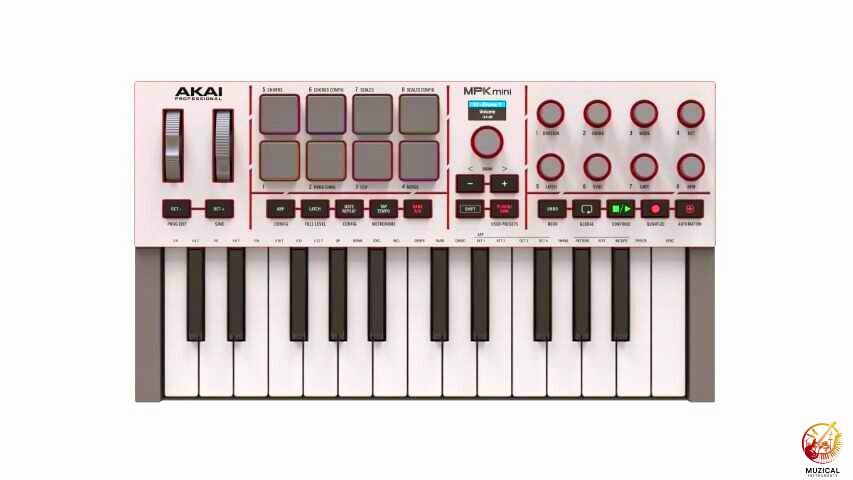
The MPK Mini IV is the biggest update AKAI has made in years. Many parts are new. The goal is a better feel and easier use.
The first thing you notice is the build. The body feels stronger and more solid. It does not bend or make noise when you press hard.
The pads are much better now. They are bright RGB pads, not dull single-color pads. Each color can mean a different job. This helps a lot in low light rooms.
Here’s a quick breakdown of the key improvements:
- 8 RGB backlit pads (vs basic LED or no lighting on older models)
- Improved key-bed with better velocity sensitivity
- Built-in speaker for standalone use without a computer
- USB-C connection instead of mini-USB
- Retro VU meter displays on the body
- Included MPC Beats 2 software (newer version)
- The joystick is replaced with real pitch and modulation wheels.
MPK Mini IV vs MPK Mini III: What Changed?
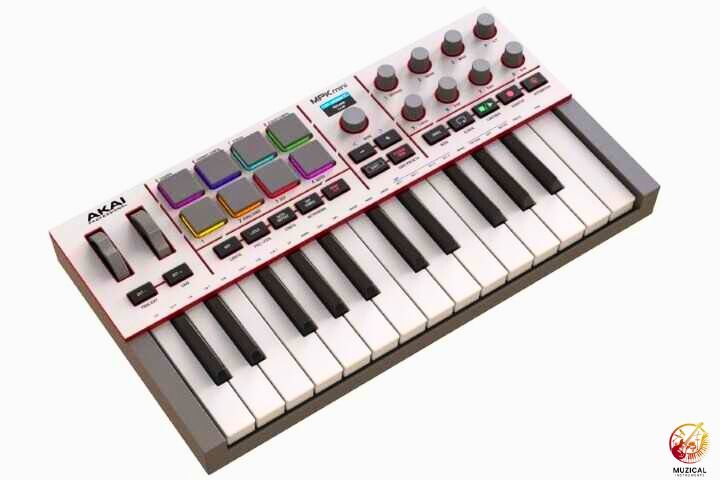
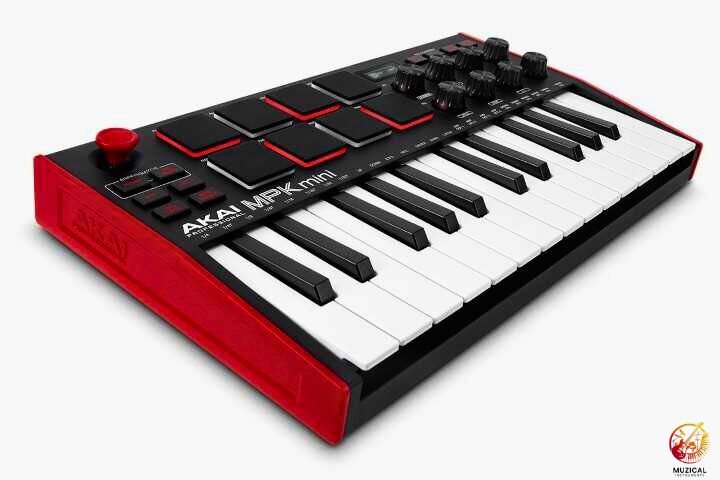
The MPK Mini IV improves control, feel, and feedback over the MPK Mini III.
The changes look small, but they matter once you start playing.
AKAI listened to what players wanted and fixed many small issues.
Why do the knobs matter?
Both the MPK Mini III and MPK Mini IV have 8 knobs. That did not change. What changed is how they feel and work. On the MPK Mini IV, the knobs feel smoother and more solid. You can control volume, effects, and sound shape with more confidence. You spend less time fixing mistakes and more time making music.
Does the MPK Mini IV feel better built?
Yes, it does. The body feels stronger and more solid. The knobs feel firm, not loose. The pads respond better and do not stick. It feels more reliable in daily use.
What’s better about the new lights?
The MPK Mini IV uses RGB lights. These colors show different tasks or sounds. The older model only had simple red lights. Now you can understand what’s happening at a glance.
MPK Mini IV vs MPK Mini II: Is the Generation Gap Too Wide?
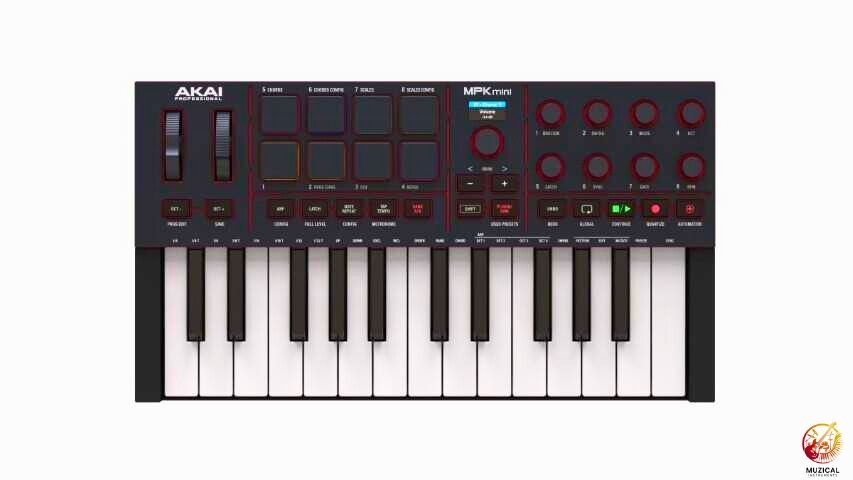
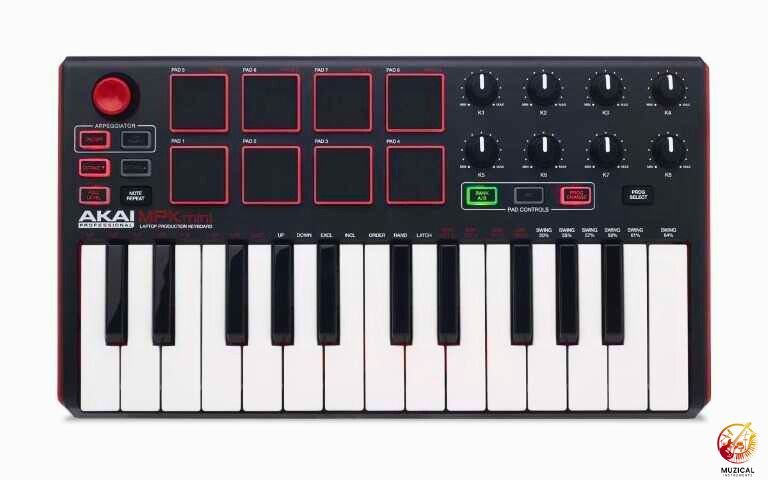
If you are moving from the MPK Mini Mark II to the IV, the change feels big. The Mark II is an older design, and the IV shows years of improvement.
The Mark II pads need a hard hit to make a sound. The IV pads react to soft taps. This makes playing beats much easier and more fun.
The knobs on the Mark II feel loose. Small turns can jump too much. The IV knobs feel firm and smooth. You can control sounds with more care.
The Mark II software is old and can cause problems on new computers. The IV comes with updated software that works well on modern systems.
Feature Comparison: What Stayed the Same?
Not everything changed between versions. Some core features remained consistent across the MPK Mini series.
All versions have:
- 25 mini keys (same size and layout)
- Octave up/down buttons
- Sustain button
- Basic arpeggiator functions
- MIDI output capability
- Compact, portable form factor
The keys stay the same. You still get 25 mini keys. They are easy to carry but small for piano-style playing.
Does the MPK Mini IV Have Better Pads Than Older Versions?
Yes, and this is a big reason many players upgrade. The MPK Mini IV uses pad tech from AKAI’s MPC line. These are the pads found on pro gear.
Older MPK Mini models had pads that felt soft and slow. You had to hit them hard to get a sound. That made finger drumming frustrating.
The MPK Mini III was better. The pads worked more often and felt smoother. But they still did not feel fully natural.
The MPK Mini IV improves this again. Light taps trigger clean sounds. Hard hits feel strong and clear. The pads respond the way your fingers expect. The RGB lights flash when you hit a pad, which helps with timing.
If you make beats or drum with your fingers, this upgrade is worth it.
Key Improvements That Make the MPK Mini IV Worth It
The MPK Mini IV adds real upgrades that help you play and create faster. These changes focus on ease, comfort, and daily use.
The built-in speaker really helps
At first, it sounds like a small extra. Then you use it. You can play without headphones. You can test ideas fast. It works well for quick beats, simple tunes, or teaching kids. The sound is not studio quality, but it is clear and useful.
USB-C makes life easier
Older MPK models used weak cables that broke often. The MPK Mini IV uses USB-C. This cable is strong and easy to replace. Most people already have one at home.
The software is much better now
Each MPK Mini version came with different software:
- Original: Came with very basic software, often outdated
- MPK Mini II: Included MPC Essentials, a stripped-down version of AKAI’s MPC software
- MPK Mini III: Upgraded to MPC Beats, a more modern and capable DAW
- MPK Mini IV: Ships with MPC Beats 2, which adds better plugin support and more sounds
These upgrades save time. They make music feel simple and fun again.
Which MPK Mini Version Offers the Best Value?
The right choice depends on how much you want to spend and how serious you are.
For new beginners
The MPK Mini II or III are good if you buy them used. They still work well for learning the basics. You get usable pads and simple software. A used Mini II often costs around $40–70. A used Mini III is usually $70–90.
For serious learners or beat makers
The MPK Mini IV is worth the extra cost. It sells new for about $99. You get more knobs, better pads, and a stronger build. These things save time and last longer.
About the original MPK Mini
Skip it unless it is free. It feels old, the pads are weak, and the cable is outdated.
Should You Upgrade from MPK Mini III to IV?
Yes, you should upgrade only if you need better control and comfort.
If your Mini III still works well, upgrading is not urgent.
This choice is tricky because the MPK Mini III is still a solid controller.
If you already own the Mini III and it works well, you do not need to rush an upgrade. The Mini III can still handle most music tasks just fine.
You may want to upgrade to the Mini IV if:
- You need more knobs to control sounds and effects at the same time
- You want a stronger build that will last for many years
- You like the idea of a built-in speaker for quick practice
- The simple pad lights on the Mini III feel limiting to you
For many users, the Mini III is still enough. It does not hold you back like older models did.
But if you are buying new today, choose the Mini IV. It usually costs only $20–30 more and gives you better hardware that will stay useful longer.
Common Problems with Older MPK Mini Models
If you’re thinking about buying a used MPK Mini, it helps to know common issues from older models.
Original MPK Mini
- Pads can stop working completely.
- Keys may stick or trigger extra notes.
- Knobs can feel scratchy or unreliable.
- Older software may not work with modern DAWs.
MPK Mini II
- Some keys trigger notes by themselves (phantom notes).
- Pads need a lot of force to register hits.
- Mini-USB port can break easily.
- Joystick may develop dead zones.
MPK Mini III
- Has 8 knobs, but they are small and close together.
- Pad sensitivity may vary between units.
- Hardware failures are less common thanks to better quality control.
MPK Mini IV
- Too new to know long-term issues.
- Early reports show it is more reliable than older versions.
This helps you spot potential problems and choose the safest used model.
The Bottom Line on MPK Mini Versions
The MPK Mini IV is AKAI’s best version yet. It fixes almost every problem users had with older models and adds helpful new features.
If you’re buying new, go for the MPK Mini IV. The better pads, stronger build, real pitch and mod wheels, and clearer lights make a real difference. The price is a bit higher, but the smoother workflow and solid feel are worth it.
Already using an MPK Mini III? You don’t need to upgrade right away. It already has 8 knobs and works well for most music tasks. Upgrade only if you want a tougher build, better pads, and more precise controls.
If you’re using the original MPK Mini or Mark II, upgrading to the IV is a big step. The pads feel far more responsive, and the controller overall feels like a professional tool instead of a toy. Your music-making will be easier and more fun, and you’ll spend less time dealing with old, unreliable hardware.
FAQ: MPK Mini IV vs Older MPK Mini Versions
1. Is the Akai MPK Mini IV good for complete beginners?
Yes, it is one of the best choices for starting out. The new Scale and Chord modes make it very easy to play songs without knowing music theory. You can press one key to play a full chord, which helps you make good-sounding music right away. Plus, it comes with all the software you need to start.
2. Can I use the MPK Mini IV without a computer?
Yes, you can! This is a big upgrade from the older version. The MPK Mini IV has a 5-pin MIDI Out port. This means you can plug it directly into other synthesizers or drum machines and play them without needing a laptop. However, you still need to plug it into a power source (like a USB wall charger) since it doesn’t have batteries.
3. Does the MPK Mini IV work with FL Studio and Logic Pro?
Absolutely. The MPK Mini IV is designed to work with all major music software like FL Studio, Logic Pro, Ableton Live, and GarageBand. It has special mapping scripts built-in, so when you plug it in, the knobs and buttons usually work automatically without you having to set them up manually.
4. Does the MPK Mini IV have a built-in speaker?
No, it does not. The standard MPK Mini IV is a controller, meaning it makes no sound on its own, it triggers sounds on your computer or iPad. If you want a keyboard with a built-in speaker and sounds, you should look for the MPK Mini Play version instead.
5. How do I connect the MPK Mini IV to an iPad or phone?
Connecting is very easy now because the MPK Mini IV uses USB-C. If you have a newer iPad or Android phone with a USB-C port, you can plug the keyboard directly into it with a standard cable. It draws power from your phone, so you can make beats anywhere you go.


